


How to Create a Children's Storybook Using AI
Create a children's storybook using AI with this practical guide to writing, consistent illustrations, page editing, PDF export, and hardcover printing.
Key points
-
Start with a clear story prompt
To create a children’s storybook with AI, define the target age, protagonist, central problem, supporting characters, emotional theme, and desired ending. These boundaries help the AI produce a more coherent, age-appropriate first draft.
-
Build visual consistency first
Consistent AI storybook illustrations begin with reusable visual references. Define each recurring character, location, and important prop before generating the pages so faces, clothing, settings, and objects remain recognizable throughout the book.
-
Treat AI content as a first draft
AI-generated children's stories should be treated as first drafts. An adult should review age-appropriate language, read-aloud rhythm, emotional clarity, factual accuracy, and originality, then revise only the passages or pages that need improvement.
A practical guide to shaping the story, building consistent characters, and turning one idea into a finished illustrated book.
Maybe your child has asked for a bedtime story in which they are the hero. Or perhaps you want to help them understand a new sibling, prepare for their first day of school, or preserve a favorite family memory. The idea is often the easy part. Turning it into a complete book requires an age-appropriate story, recognizable characters, and illustrations that remain consistent from page to page. AI makes that process much more accessible, even if you have no writing or drawing experience. With ReadKidz, you can turn a single idea into a fully illustrated children's storybook in one creative workspace. When it is finished, you can read it digitally, export a printable PDF, or order a printed copy through ReadKidz as a lasting family keepsake. This guide shows you how to create a children's storybook with ReadKidz, from the first idea to the finished book.
Before You Start: What Kind of Storybook Are You Making?
Before opening an AI tool, think about why you want to create the book and who will read it. That choice will shape the story length, vocabulary, emotional tone, characters, illustration style, and ending.
A personalized bedtime story for your child. Your child could become the hero of a gentle adventure featuring a favorite animal, place, or family tradition. Bedtime books usually work best with a simple plot, a reassuring ending, and language that feels natural when read aloud. For inspiration, read Ember's Sleepy Spark, a calming bedtime story about a young dragon.
A story about feelings or growing up. A picture book can help a child talk about starting school, welcoming a new sibling, making friends, sharing, or managing a difficult emotion. The lesson usually feels more natural when the character experiences it through the story. Milo and the Weather Inside shows how a story can help children name and discuss big feelings.
An educational story built around curiosity. Parents and teachers can turn topics such as space, dinosaurs, nature, history, or new vocabulary into an age-appropriate adventure. Instead of presenting facts as a lesson, let the character discover them through the plot. See how Pip, the Littlest Star introduces a space-related idea through a children's story.
A family memory or keepsake. You might preserve a grandparent's childhood, a family tradition, a favorite holiday, or the story of a beloved pet. These books benefit from specific names, places, objects, and small details that make the memory feel personal. The Quilt of All Our Homes offers an example of a story built around memory, care, and belonging.
An original book you may eventually publish. If you hope to print or sell the book, begin with characters and a story world you created yourself. Avoid copyrighted characters or fictional franchises you do not own or have permission to use, and think early about the age range, book length, and whether the idea could develop into a series.
Once you know what kind of book you want to make, you can give ReadKidz a much clearer starting point. Start creating your picture book with one character, one situation, and one feeling you want the reader to remember.
How to Create a Children's Storybook Using AI
The process can be divided into six creative stages. You can complete these stages with separate writing, image-generation, and design tools, or keep them together in an AI storybook platform such as ReadKidz.
Step 1: Choose How You Want to Start
You do not need a polished prompt or finished manuscript to begin. ReadKidz can work with whatever you already have.
Start with words. Enter a single idea, paste a complete story, add a page-by-page draft, or use a poem, nursery rhyme, or other rhyming text.
If you begin with an idea, include the intended reader, main character, problem, and emotional direction. Compare these two prompts:
Too broad: Write a children's story about a girl who is afraid of the dark.
More useful: Create a gentle bedtime story for children ages five to seven about Maya, a six-year-old girl whose night-light stops working. With the help of her grandmother and a curious orange cat, she makes a small constellation lantern and discovers that the dark can hold beautiful things too. End with Maya feeling safe and proud.
A simple formula is: Age or audience + protagonist + problem + supporting characters + emotional theme + desired ending
The stronger prompt gives ReadKidz useful creative boundaries without deciding every scene in advance.
Start with an image. One of the most personal ways to create an AI storybook is to begin with someone your child already knows and loves. Upload a photo of your child, a sibling, a parent, a grandparent, a pet, or even a favorite stuffed toy, and ReadKidz can turn it into an illustrated character who remains recognizable throughout the book.
This makes the finished story feel like it belongs to your family, rather than simply placing your child's name inside a generic tale. The character can carry familiar features into the art style you choose, while up to five characters can appear in the same book. A child, their sibling, their parents or grandparents, and a much-loved pet can all become part of one story worth keeping.
Start with an existing character. If you have already created a character in ReadKidz, you can bring them into a new book or continue their story as part of a series.
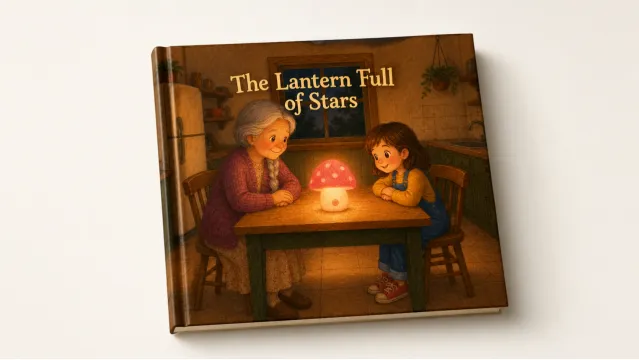
For this guide, we used the stronger prompt above as the starting point for The Lantern Full of Stars.
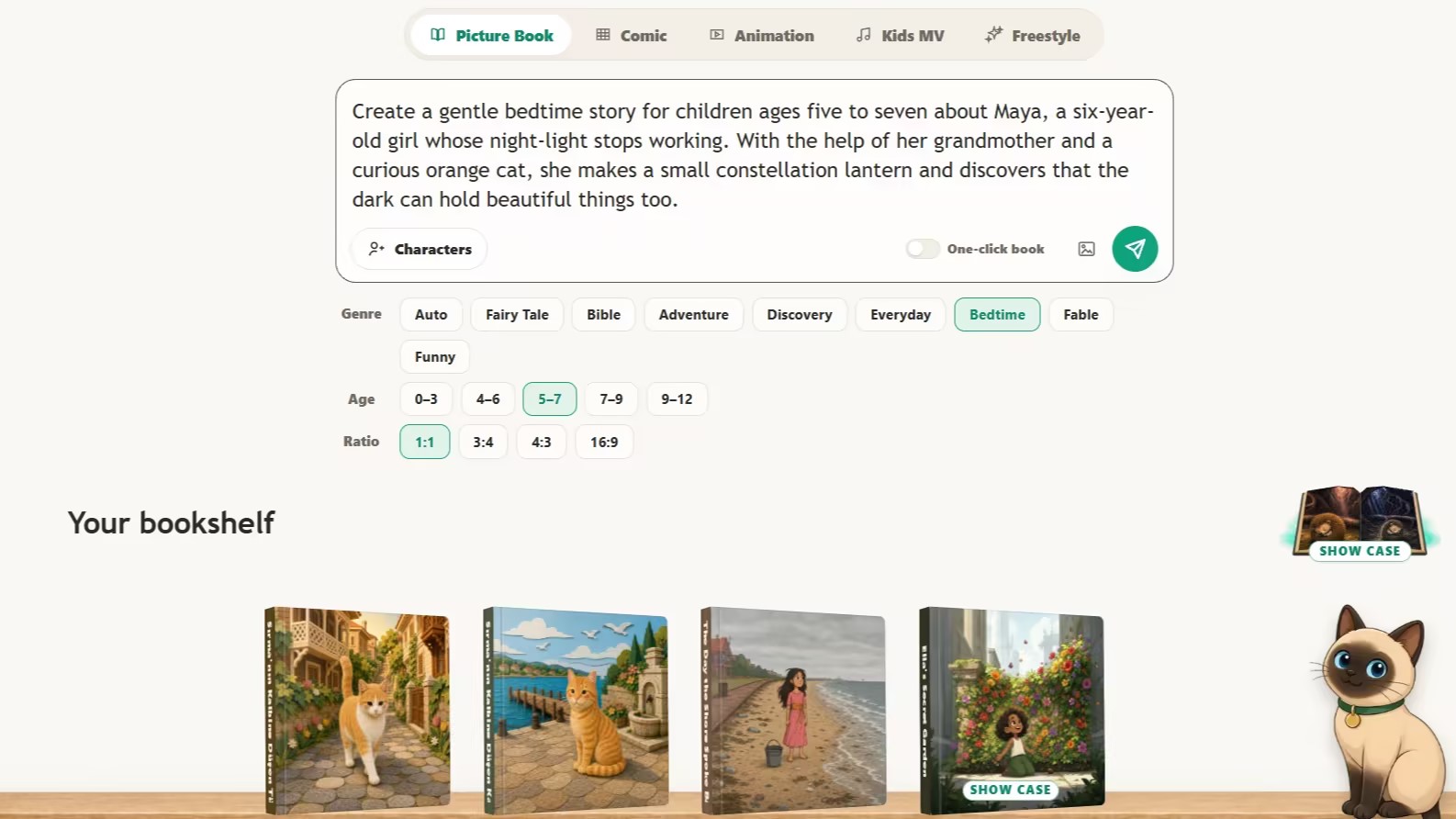
Start your storybook with ReadKidz
Step 2: Review and Refine the Story
Treat an AI-generated story as a first draft. Read it from beginning to end and check whether the protagonist has a clear goal, the events flow naturally, the conflict suits the reader's age, and the ending completes the emotional journey. Then remove repetition, abstract lessons, and sentences that may be difficult to read aloud.
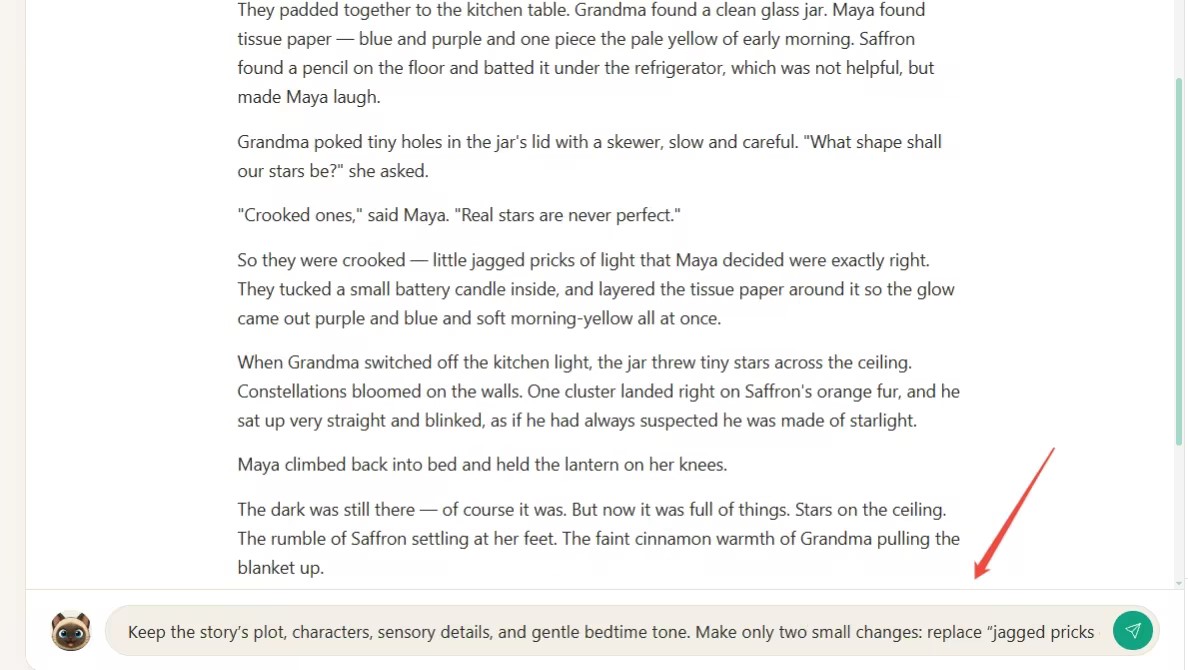
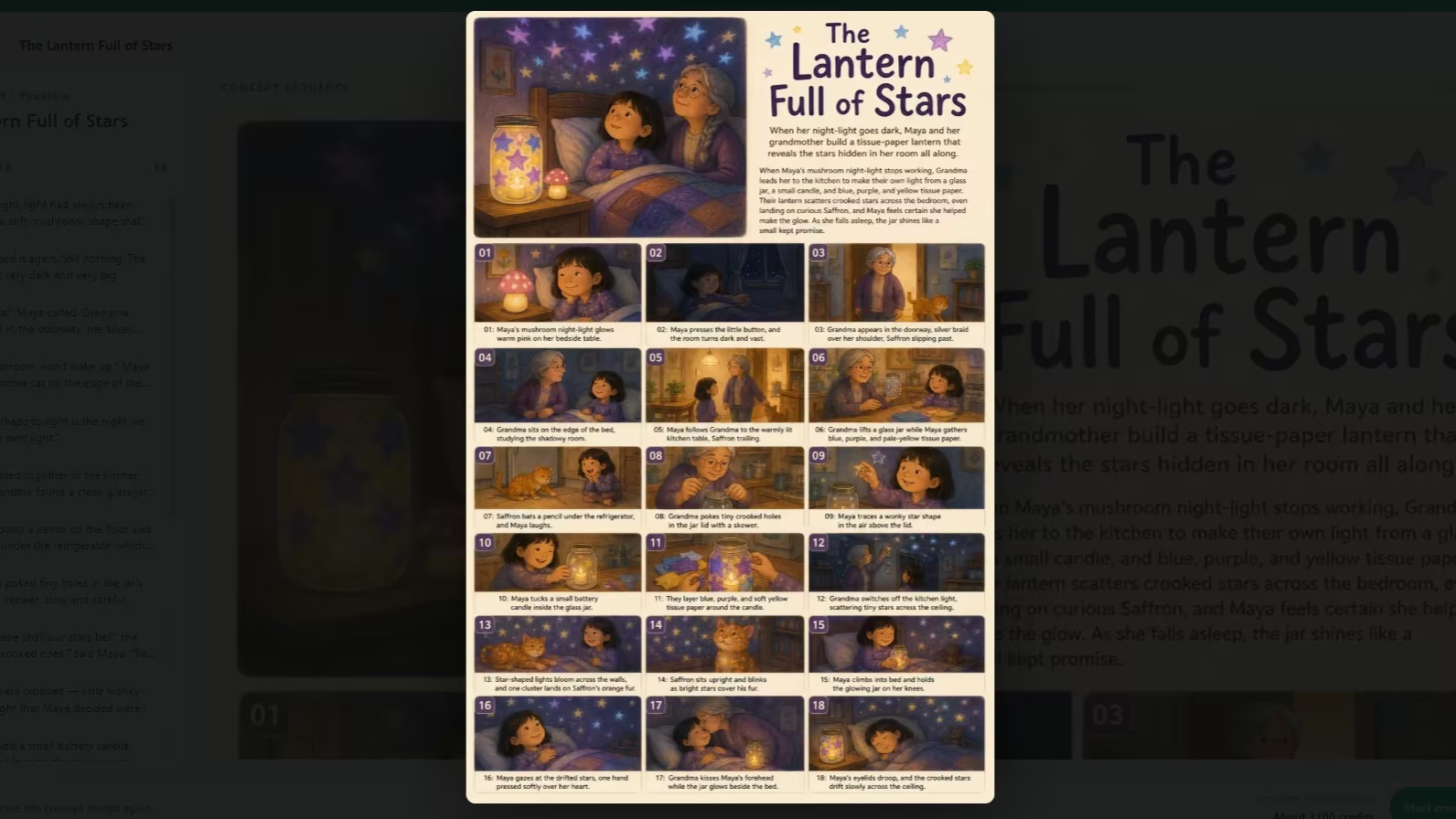
ReadKidz developed our prompt into a 16-page bedtime story, The Lantern Full of Stars, featuring Maya, Grandma, and Saffron. The first draft already had a gentle rhythm and a clear emotional arc, so we turned to Pudding, the AI assistant built into ReadKidz, and requested only two focused changes:
Keep the plot, characters, and bedtime tone. Replace “jagged pricks of light” with more child-friendly language, and make Maya's sense of safety and pride slightly clearer near the end. Keep the lesson subtle.
You can talk to Pudding in everyday language to refine the complete story, or use it to revise a single passage while keeping everything else unchanged.
Step 3: Choose an Illustration Style That Fits the Story
Art style shapes how a story feels. Soft watercolor or colored pencil often suits a gentle bedtime story, while bold colors may work better for a lively adventure. Choose a style that supports the story's mood and keeps the characters clear and consistent.
ReadKidz offers more than 98 illustration styles. For The Lantern Full of Stars, we chose Warm Colored-Pencil Flat. Its soft, hand-drawn texture creates the warm, comforting atmosphere that works especially well for a bedtime story.
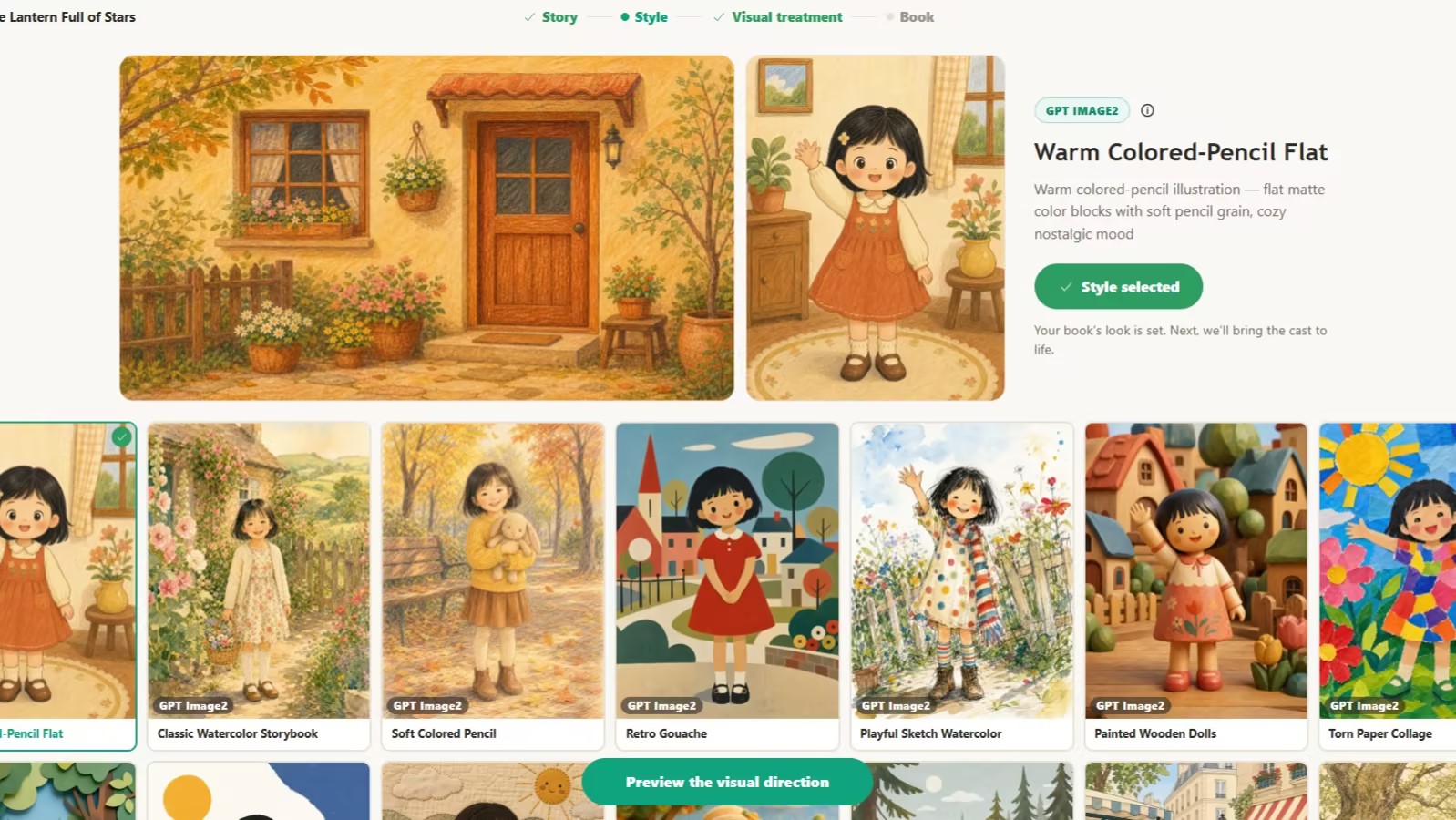
One common frustration with AI illustration tools is discovering that the chosen style does not suit the story only after the full book has been generated. ReadKidz lets you preview the book's visual direction first, so you can review the overall look and return to choose another style before generating every page.
Step 4. Build a Consistent Visual World
One of the biggest challenges with AI-generated illustrations is keeping the same character recognizable from page to page. A child's face, clothing, or proportions may change, while familiar rooms and important objects can suddenly look different.
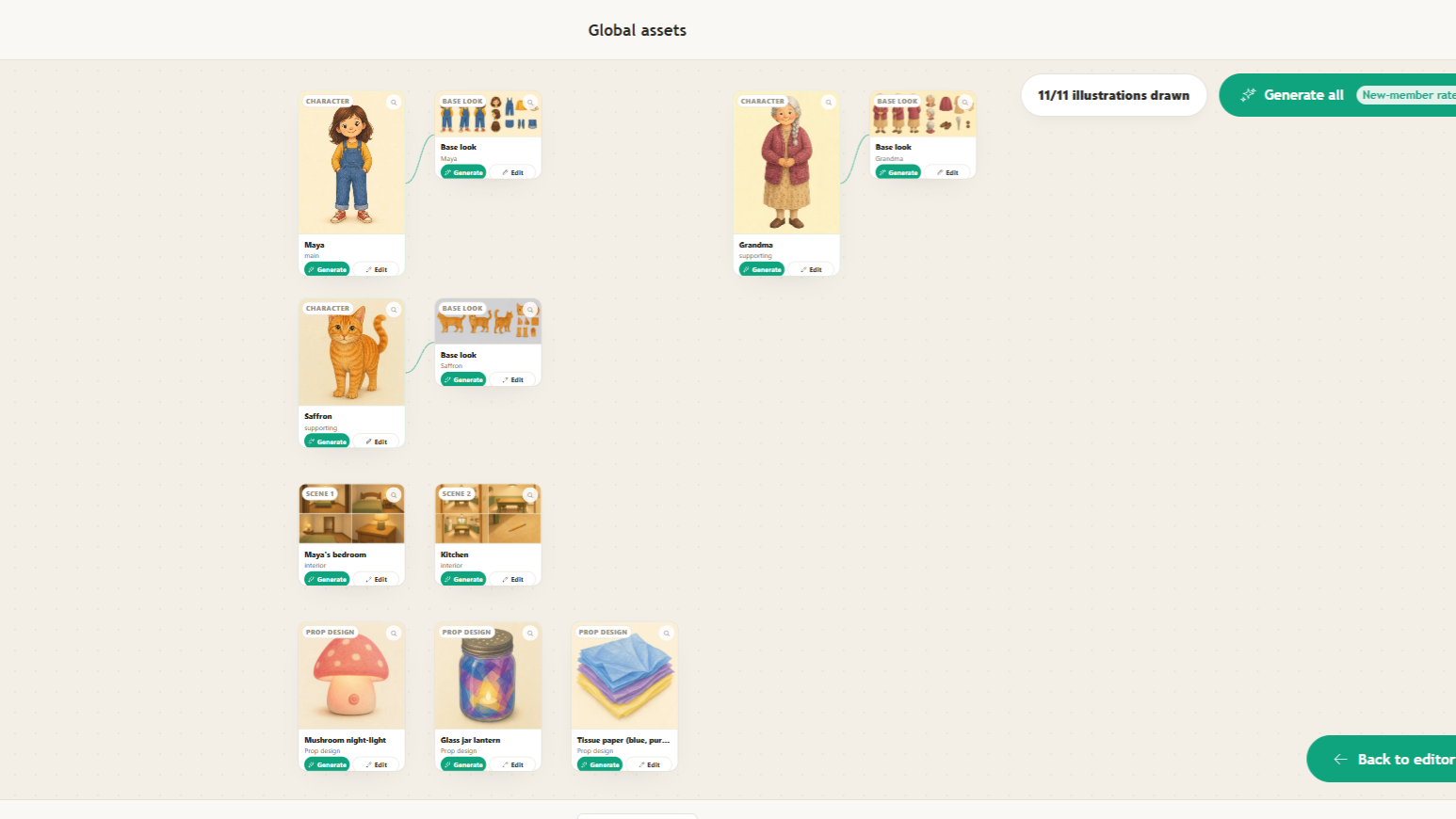
To reduce these inconsistencies, ReadKidz creates a set of global assets before illustrating the full book. Think of them as a shared visual reference for every page, covering the recurring characters, locations, and objects in the story.
For The Lantern Full of Stars, ReadKidz identified Maya, Grandma, and Saffron as the main cast; Maya's bedroom and the kitchen as recurring locations; and the mushroom night-light, glass jar lantern, and tissue paper as important props. Instead of creating each reference separately, you can generate all the identified assets with one click.
Once they are ready, review the complete visual cast and regenerate or edit any character, scene, or prop that does not match your vision before moving on to the page illustrations.
Step 5. Generate and Refine Your Book
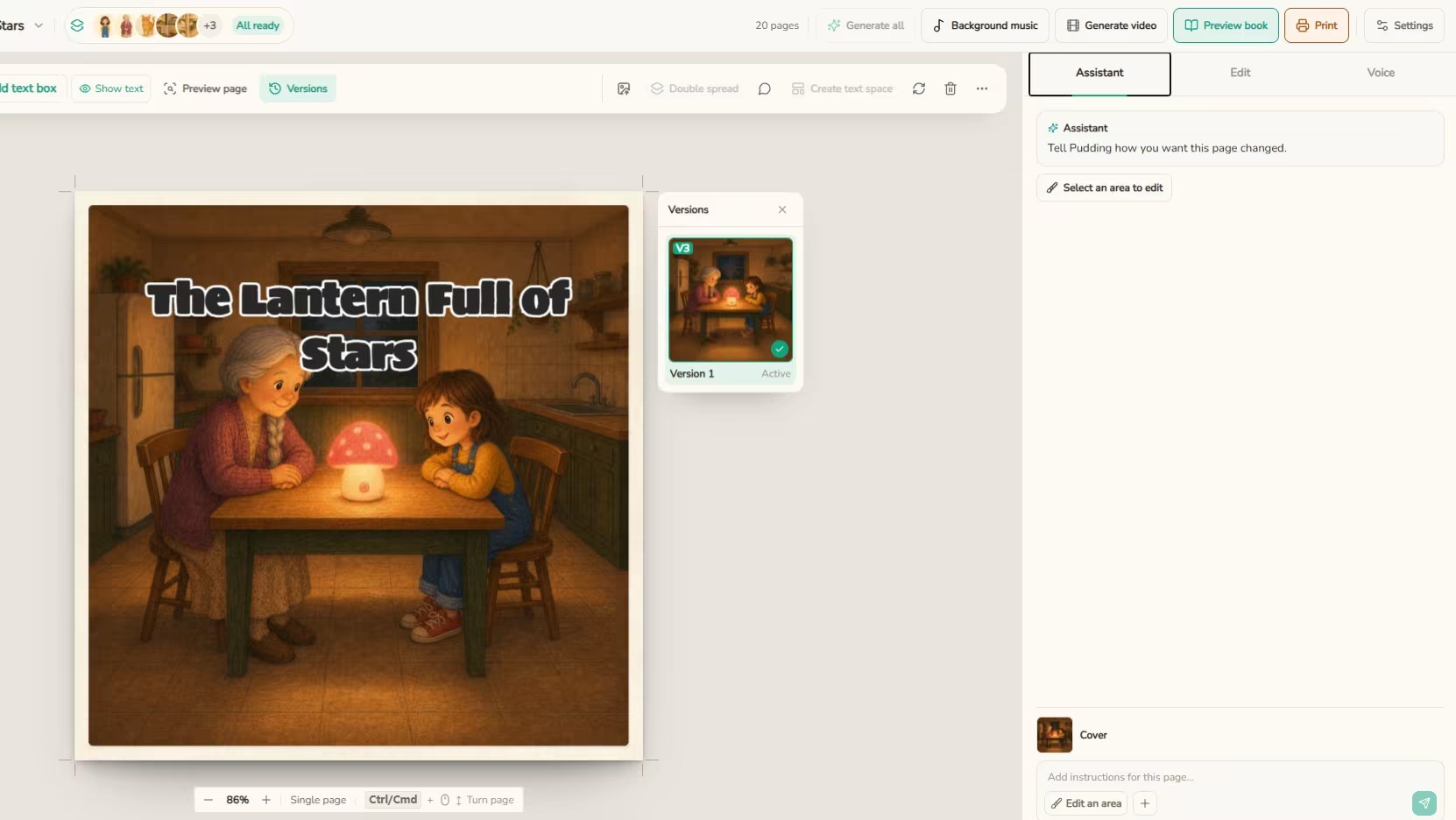
Once the global assets are ready, click Generate all to create the cover and every illustrated page at once. ReadKidz applies the characters, scenes, props, and visual style established earlier throughout the book. For The Lantern Full of Stars, the complete set of pages was generated in under five minutes.
A good storybook page, however, needs more than an attractive illustration. The image should match the text, the characters should look right, and the words need to be clear and comfortable to read. With many general AI image tools, fixing one small problem means regenerating the entire image—and potentially losing the details you already liked.
ReadKidz lets you refine each page inside the book editor. Tell Pudding, the built-in AI assistant, what you want changed, or select a specific area such as a character, object, or part of the background. This allows you to correct one detail while preserving the rest of the illustration.
The text remains fully editable as well. You can rewrite a sentence, change the font, and adjust its size or position. One-click translation can also turn the story into a bilingual picture book without rebuilding it from the beginning.
Step 6. Export or Print Your Book
Once your children's book is finished, you have real choices for how to bring it into the world.
Export as a PDF. If you want to share the story immediately, keep a digital copy, or use it for reading at home or in the classroom, you can export the finished book from ReadKidz as a PDF. You can also add a custom watermark, giving a family keepsake, classroom resource, or original publication a more personal and recognizable identity. To see how our example came together, read the finished version of The Lantern Full of Stars.
Print a hardcover. A digital storybook is easy to share, but a printed copy gives the story a permanent place in your family. Once your book is finished, you can order a full-color hardcover directly through ReadKidz and keep it as a bedtime favorite, a birthday gift, or a family keepsake.
Printed books are available in 21 × 21 cm and 21 × 28 cm formats. Each book features a 3 mm hardcover wrapped in matte-laminated art paper, with thick 250 gsm matte-laminated interior pages and butterfly binding designed to open flat for shared reading.
ReadKidz currently ships printed books to the United States, Canada, the United Kingdom, France, Italy, Spain, Australia, Japan, South Korea, Mainland China, Hong Kong, and Taiwan. Most importantly, every printed-book order includes a complimentary book optimization service from the ReadKidz team. Before the story becomes a physical keepsake, the team helps ensure the book is ready for the best possible printed result.
Animated Story. Your finished picture book can also become an animated story without starting a separate video project from scratch. Add narration, then use ReadKidz to generate an animated video with one click, using the story, characters, and illustrations you have already created. For parents, this gives children another way to enjoy the same story through listening and watching. For KDP authors, the animated version can be published on YouTube as promotional content, giving viewers a preview of the story and encouraging them to purchase the complete book through the link in the video description.
A finished story does not have to be experienced in only one format. ReadKidz offers several ways for children and families to return to the same book.
The traditional page view keeps the focus on reading together and works naturally for quiet bedtime moments. The 3D reading space places the book inside an immersive environment, making digital reading feel more like entering a story world. Children can also switch to a pop-up book experience, where characters and scenes rise from the pages and give familiar moments a new sense of depth.
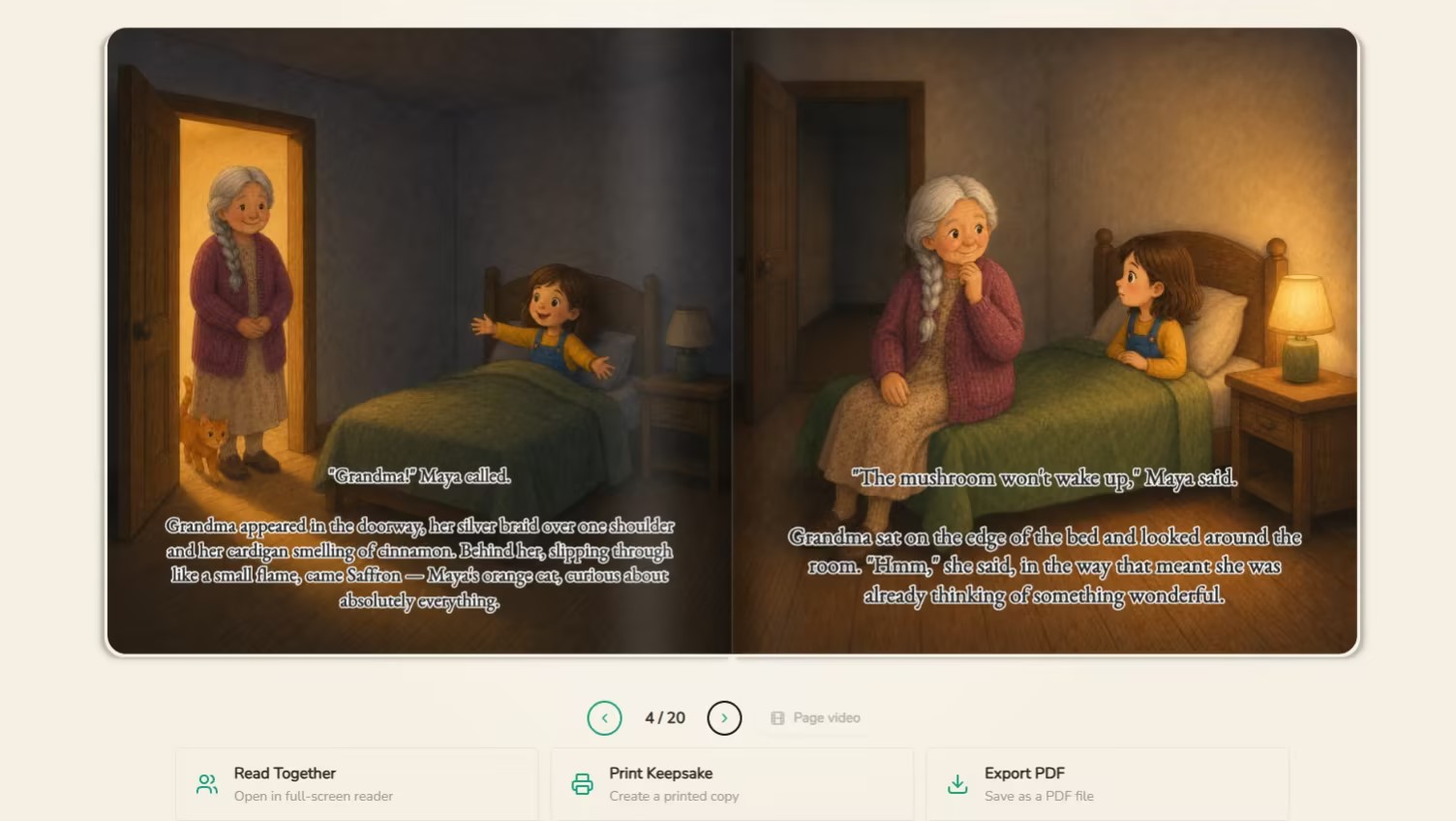
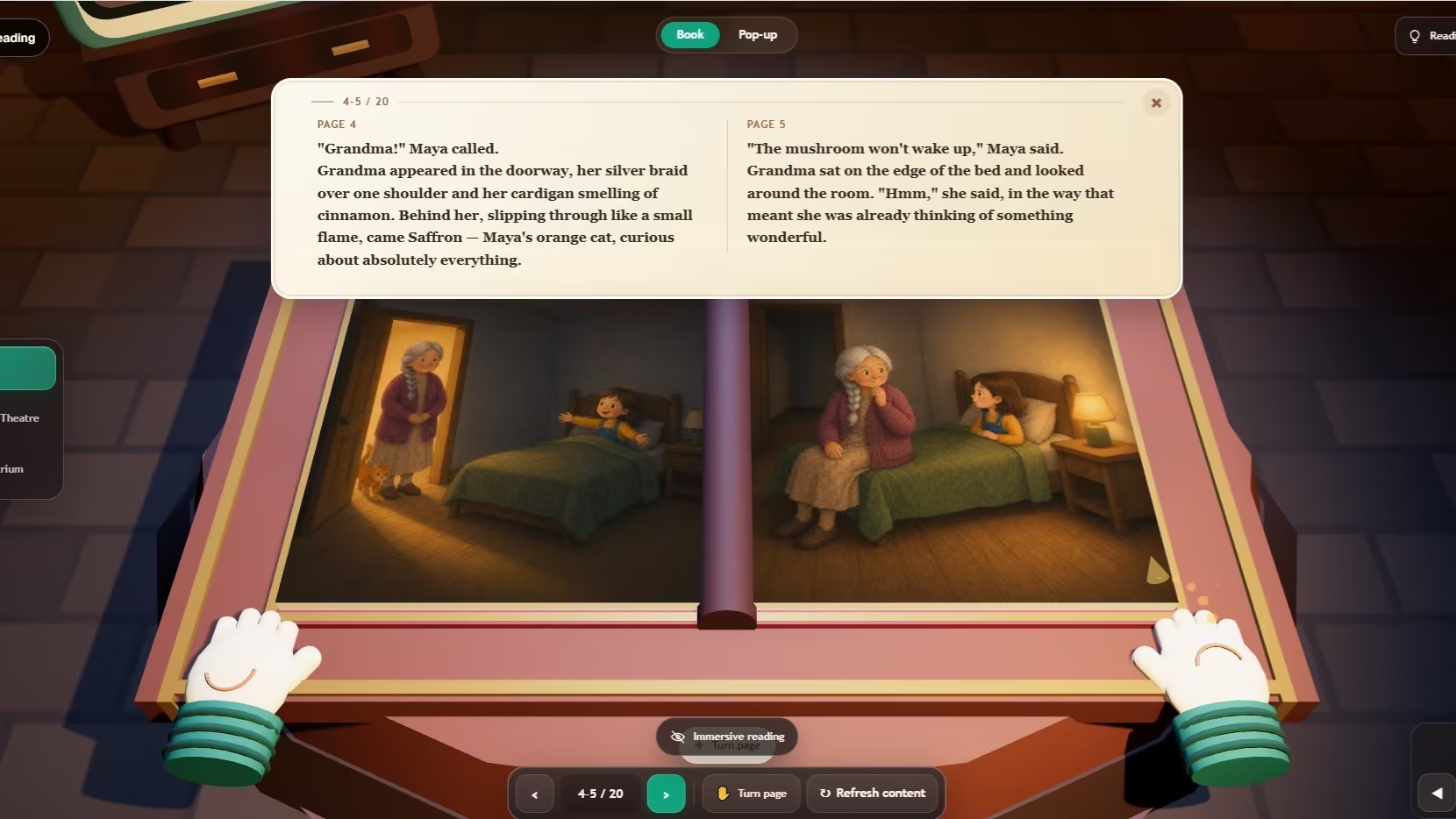
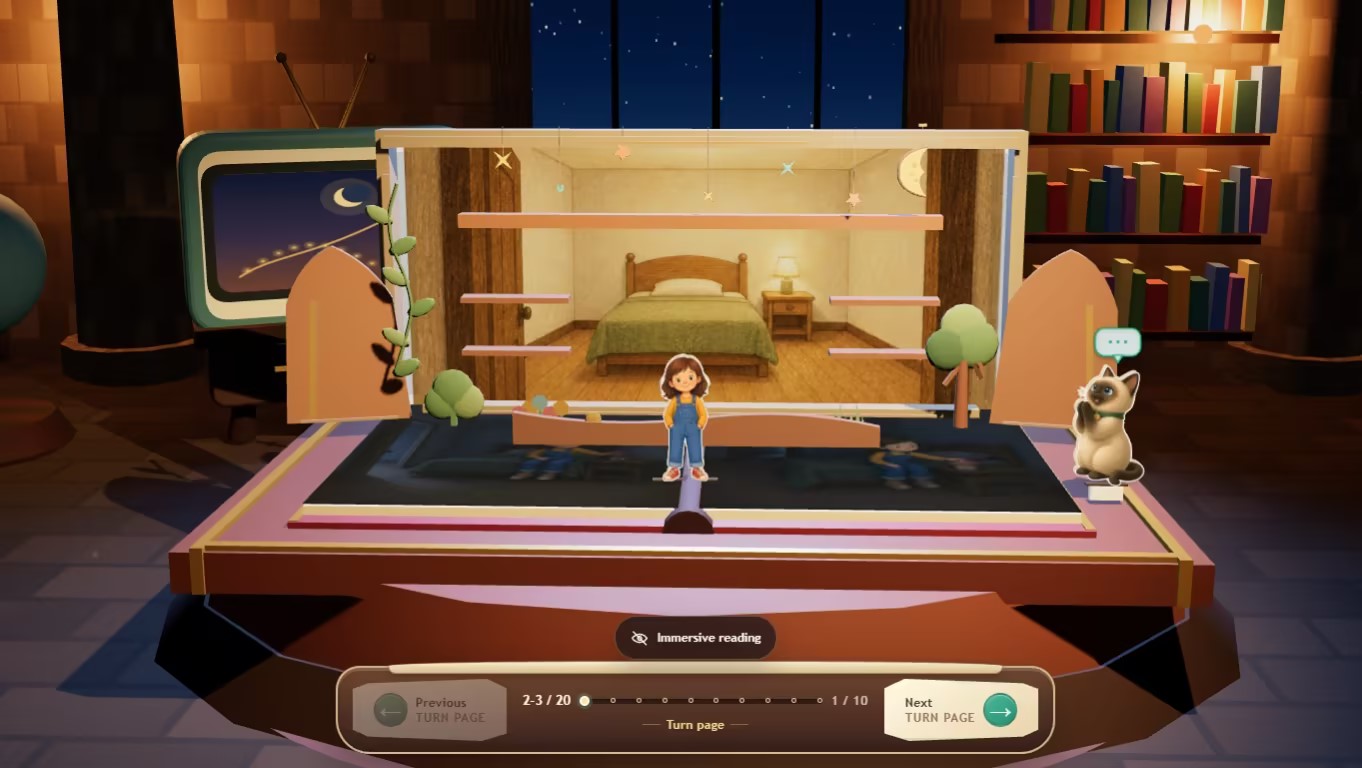
These options let families choose between calm read-aloud time and a more visual, interactive experience—without creating separate versions of the story.
How Much Should You Edit AI-Generated Content?
AI can accelerate the first draft, but an adult should still review every part of a children’s storybook.
Age-appropriate language
Replace complicated words unless the context helps the child understand them. Break long sentences into shorter ones, and avoid placing too much text on one page.
Read-aloud rhythm
Read every line aloud and listen for awkward phrasing, accidental repetition, or sentences that are difficult to say naturally.
Emotional clarity
Make sure the conflict is understandable without becoming unnecessarily frightening or intense. Difficult subjects need reassurance and resolution.
Factual accuracy
Educational stories need careful review. Verify names, numbers, historical details, and scientific claims before sharing the book.
Originality
Generic AI drafts often rely on familiar expressions and predictable lessons. Add personal details, playful language, or a specific setting to make the story feel like yours.
Common Mistakes When Making an AI Storybook
Starting with an idea that is too broad
Give the AI a character, goal, setting, and emotional theme.
Forgetting the target age
Without an age range, the story may combine preschool ideas with language suited to much older readers.
Adding too many characters
Begin with one protagonist and a small number of supporting characters.
Using too much text
Give the illustrations room to participate in the storytelling.
Accepting the first draft
Generation is the beginning of the creative process, not the end.
Reviewing pages but not the whole book
Always perform a cover-to-cover review for consistency and pacing.
What Can You Make With an AI Storybook Creator?
An AI-created book does not have to be a traditional fairy tale. You could create:
- A bedtime story based on a child’s favorite animal
- A first-day-of-school story about managing anxiety
- A book that explains the solar system through an adventure
- A story introducing a new sibling
- A family memory featuring a grandparent
- A classroom story built around new vocabulary
- A recurring series with the same main character
- A narrated storybook video
- A personalized gift for a birthday or holiday
The technology is most useful when it helps you create something specific for a real reader.
How to Choose an AI Storybook Creator
Different tools support different parts of the process. Before choosing one, consider whether it can:
- Generate both stories and illustrations
- Work with a story you have already written
- Adapt language to different age groups
- Maintain recognizable characters across pages
- Keep the illustration style consistent
- Revise individual passages or pictures
- Show the complete book before you finish
- Support your preferred language
- Provide the reading, printing, or video options you need
You could combine a writing assistant, image generator, and layout application. However, moving between several tools means managing prompts, image files, character references, page sizes, and revisions separately.
A dedicated platform such as ReadKidz keeps the story, cast, scenes, illustrations, and finished pages in one workspace. That makes it especially useful for first-time creators who want to concentrate on the book rather than assemble a production system.
Turn Your Story Idea Into a Book
The most important part of a children’s storybook is not the technology behind it. It is the experience you want to create for the reader.
Start with one child, one character, one problem, and one feeling. Let AI help you explore the possibilities, but keep making the decisions that give the story its personality and purpose. With ReadKidz, you can develop the story, shape the characters, choose a visual world, generate the illustrated pages, and finish the book in one connected creative process.
Start creating your first storybook with ReadKidz→ Visit ReadKidz
Where ReadKidz fits
- Managing multiple disconnected tools Using separate tools for writing, illustration, layout, and editing creates extra work managing prompts, image files, character references, page sizes, and revisions. How to Choose an AI Storybook Creator
- Inconsistent characters across pages General AI image tools may change a character’s face, clothing, colors, or proportions from one illustration to the next. Build a Consistent Visual World
- Starting over to fix one detail With general AI image tools, correcting one character or background detail may require regenerating the entire illustration and losing elements that already work. Generate and Refine Your Book
Questions parents ask
How Can I Turn My AI Storybook into a Printed Book?
Once your storybook is finished, you can export a printable PDF or order a full-color hardcover directly through ReadKidz. Printed-book orders also include a complimentary optimization service from the ReadKidz team, helping you turn the digital story into a bedtime favorite, personal gift, or lasting family keepsake.
Can I make a children's book with AI if I can't draw?
Yes. You can begin with a simple idea, an existing story, or a photo, and use AI to develop the illustrations. You still guide the characters, mood, and visual style, then review what should be changed. Creative judgment matters more than professional drawing experience.
What age range should I choose for an AI children's storybook?
Choose the age range based on the child who will read or hear the story. Younger children usually need shorter sentences, familiar vocabulary, simple plots, and more visual storytelling. Older children can follow longer scenes and more complex conflicts. ReadKidz uses the selected age range to help shape the story and language.
Can I turn my child's photo into a storybook character?
Yes. A clear photo can be transformed into an illustrated character for a personalized storybook. Review the character design before generating every page so the result still feels recognizable. ReadKidz can also illustrate photos of siblings, parents, grandparents, pets, and favorite stuffed toys.
How long does it take to create a children's book with AI?
AI can produce an initial storybook in minutes, but the complete process also includes choosing a style, reviewing the text, correcting illustrations, and checking the finished layout. In our example, ReadKidz generated all illustrated pages for The Lantern Full of Stars in under five minutes; final refinement took additional time.